
Looking for a strong, icy-themed identity in Whiteout Survival? This page gives you a Whiteout Survival Name Generator, handpicked name ideas, Chief-style names, and name symbols you can copy and paste fast. You’ll also find quick guidance for name change and how to use the font generator smoothly without errors.
➢ Whiteout Survival Name Generator ☆
Best Whiteout Survival Name Ideas
▄︻デ𝓜𝓸𝓻𝓮 𝓲𝓭𝓮𝓪𝓼━一 Whiteout survival blank name 💥 Invisible Name Copy and Paste
Whiteout Survival Chief Name Ideas
▄︻デ𝓜𝓸𝓻𝓮━一💥 100+ Welcome To My Profile Stylish Name
Whiteout Survival Name Symbols
▄︻デ𝓜𝓸𝓻𝓮━一💥 Top 100 Most Dangerous Names
Whiteout Survival Name Change
Changing your name in Whiteout Survival is useful when you want a cleaner clan identity, a new “Chief” vibe, or a fresh seasonal theme (ice / fire / survival). In most cases, games like this require a Name Change item (often called a Rename Card or similar) or a premium currency option.
Typical steps (in-game flow):
- Open Profile / Avatar (tap your character icon).
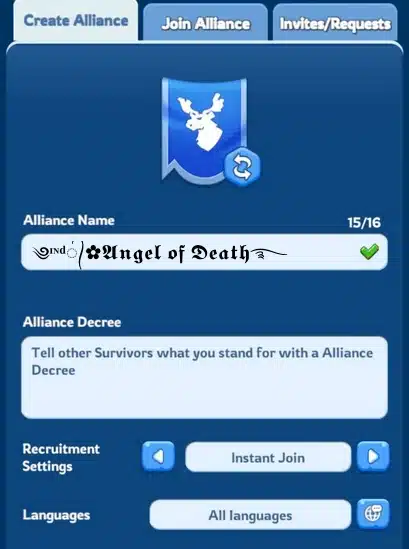
- Find Name / Edit (pencil icon or “Change Name” button).
- Enter your new name → preview → confirm.
- If the game asks for a rename item/currency, follow the prompt to use it.
Important tips before you confirm:
- Keep the name easy to read in chat, rallies, and alliance logs.
- Avoid overly long names; some games cut off long text in UI.
- If your “stylish” name doesn’t save, switch to a simpler version (normal letters + a few symbols).
- If you’re a Chief, consider a consistent pattern for your alliance (example:
FROST_Chief,ChiefFrost,WOS-Chief).
✨EMOJI ART COLLECTIONS
Pick a topic below to explore more ready-made emoji art, cute symbol combos and text designs you can copy and paste into messages, chats, bios, comments or posts.
How To Use Whiteout Survival Font Generator Copy And Paste
This Whiteout Survival Font Generator helps you create name styles with fonts + symbols you can copy and paste into the game. Because each device/game can support different characters, it’s smart to test a few styles.
How to use (quick):
- Type your name / keyword into the generator (example:
Frost,Tundra,Wolf,Ember). - The tool will output multiple font styles and symbol combinations.
- Tap Copy on the style you like.
- Open Whiteout Survival → go to Name Change (Profile → Edit Name).
- Paste the name → check how it looks → confirm.
Copy-paste tips (to avoid errors):
- If paste fails, remove some rare symbols/emoji and try again.
- If letters show as □□□, that font is not supported on your device/game UI—use a simpler style.
- Keep a “backup” version: one stylish name and one safe name (A–Z + numbers) for emergencies.
- For alliance consistency, reuse a small set of symbols like
『 』,•,_,-so members look uniform. - Whiteout survival invisible name with Blank Text Copy Paste
🛠️Emoji & Text Tools You Might Love
Use these tools to boost your emoji art, messages and profiles with animated text, spam emojis, fancy fonts and more.
- Free Fire Nickname Space Unicode 2026 – Small, Short, Large

- 50+ Raistar Stylish Name Copy For Free Fire ID (2026)
- 100+ Welcome To My Profile Stylish Name 2026 – Boys & Girls
