Want your caller ID to look clean, stylish, and recognizable in 2026? This guide shows how to change your name on Truecaller, how to fix common update issues, and a curated Top Name Ideas list you can copy and paste instantly.


How to Change Your Name on Truecaller (2026)

Truecaller usually pulls your identity from your Truecaller profile, so updating it there is the most direct method.

Method 1: Change your name inside the Truecaller app

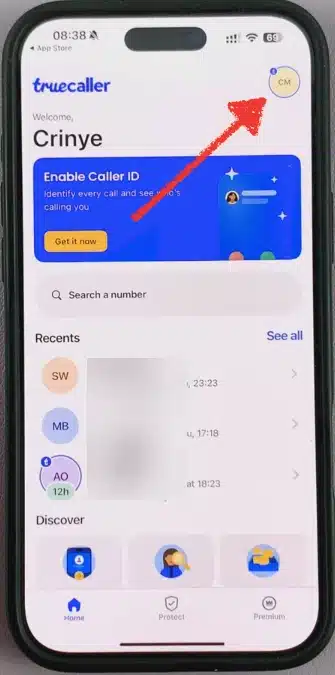
  • Open Truecaller on your phone.
  • Tap your Profile (avatar / profile icon).
Tap your Profile on Truecaller
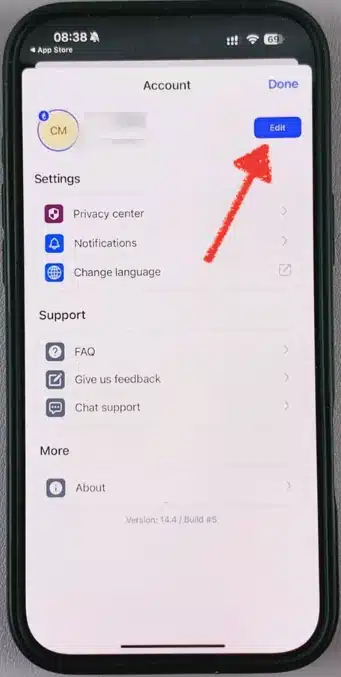
  • Choose Edit profile (or the pencil/edit icon).
Choose Edit profile
Choose Edit profile
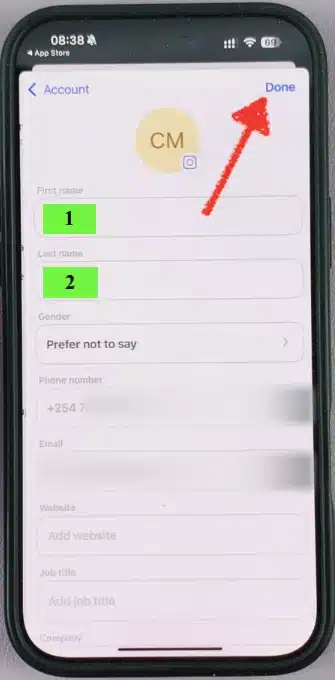
  • Update your Name (and other info if needed).
Tap Done
Tap Done
  • Tap Done.

Method 2: If you canโ€™t find the edit option

Depending on your version/region, the menu labels can vary. Try:

  • Profile โ†’ Edit (pencil icon)
  • Settings โ†’ Profile
  • Tap your current name at the top of the profile screen

What happens after you change it?

  • Your updated name may not appear everywhere instantly.
  • Some people will still see your saved contact name if they already saved you in their phone.

๐Ÿ’ฅ๐ŸŒธ๐ŸŒฟ๐Ÿ’“ Want more ideas for your name, bio, profile or comments on social media and games? Use these free tools to create stylish names, invisible names, fancy fonts, text art and ready-made comments.


Top Truecaller Name List Ideas 2026

Below are ready-to-use names for your Truecaller ID. Theyโ€™re written to be global-friendly, readable, and visually stylish.
Copy any line and paste it into Truecaller.

๐Ÿ“ž ๐‘ถ๐’๐’๐’š โ€ข ๐‘ถ๐’‡๐’‡๐’Š๐’„๐’Š๐’‚๐’
โœจ ๐•‹๐•ฃ๐•ฆ๐•ค๐•ฅ โœฆ ๐•ƒ๐•š๐•Ÿ๐•–
โœ… ๐™๐™š๐™–๐™ก โ€ข ๐™‰๐™–๐™ข๐™š
๐Ÿ’ผ ๐‘ฉ๐’–๐’”๐’Š๐’๐’†๐’”๐’” โ•‘ ๐‘ณ๐’Š๐’๐’†
๐Ÿ“ ๐•ฎ๐–Ž๐–™๐–ž โ€ข ๐•ฎ๐–†๐–‘๐–‘
๐Ÿงพ ๐Ž๐ซ๐๐ž๐ซ๐ฌ | ๐‹๐ข๐ง๐ž
๐Ÿงฟ ๐“’๐“ช๐“ต๐“ต โ€ข ๐“œ๐“ช๐“ท๐“ช๐“ฐ๐“ฎ๐“ป
โญ ๐•Š๐•š๐•˜๐•Ÿ๐•’๐• โœฆ ๐•Š๐•ž๐•’๐•ฃ๐•ฅ
๐Ÿ“จ ๐™ˆ๐™š๐™จ๐™จ๐™–๐™œ๐™š โ€ข ๐™‡๐™ž๐™ฃ๐™š
๐Ÿ”น ๐” ๐”ฉ๐”ข๐”ž๐”ซ โ•‘ ๐”ฆ๐”ก
๐ŸŒŸ ๐•Š๐•ฅ๐•’๐•ฃ โ€ข ๐•ƒ๐•š๐•Ÿ๐•–
๐Ÿ”” ๐‘ต๐’†๐’˜ โ€ข ๐‘ฐ๐‘ซ
๐Ÿช„ ๐™Ž๐™ฉ๐™ฎ๐™ก๐™š โœง ๐™„๐˜ฟ
๐ŸงŠ ๐•ฎ๐–”๐–”๐–‘ โ€ข ๐•ท๐–Ž๐–“๐–Š
๐ŸŒฟ ๐‘บ๐’๐’‡๐’• โ•‘ ๐‘ช๐’‚๐’๐’
โšก ๐™Œ๐™ช๐™ž๐™˜๐™  โ€ข ๐™‡๐™ž๐™ฃ๐™š
๐Ÿ•ถ๏ธ ๐•„๐• ๐••๐•– โœฆ ๐•†๐•Ÿ
๐ŸŒ™ ๐“œ๐“ฒ๐“ญ๐“ท๐“ฒ๐“ฐ๐“ฑ๐“ฝ โ€ข ๐“›๐“ฒ๐“ท๐“ฎ
๐Ÿ“Œ ๏ผฏ๏ฝ†๏ฝ†๏ฝ‰๏ฝƒ๏ฝ‰๏ฝ๏ฝŒ ๏ฝœ ๏ผฃ๏ฝ๏ฝŒ๏ฝŒ
๐Ÿท๏ธ แŽขแ’แฌแ•แŽข | แแŽชแŽทแŽฌ

๐“œ๐“ธ๐“ป๐“ฎ โžก๏ธ Best Truecaller Name โ€“ Attitude Truecaller ID Names

Best Truecaller Name

How To Change Truecaller Name Without App ?

If you donโ€™t want to use the Truecaller mobile app, your options are more limited because Truecaller profile edits are mainly designed for in-app updates. Still, these methods can help depending on what you mean by โ€œwithout appโ€ (no install / no login / no Truecaller settings).

Option 1: Update the name people see from your phone contacts

In many cases, if someone already saved your number, their phone will show their saved contact name (not your Truecaller name).

  • Ask the person to save you as your preferred name (or update the contact).
  • This is the fastest โ€œno-appโ€ fix for friends/clients who already have your number.

Option 2: Change your name through your linked account/profile sources

Sometimes the label shown can be influenced by information connected to your number (varies by region/device):

  • Update your name in your Google account / Apple ID profile (if you use it publicly for caller identity in your ecosystem).
  • Keep your display name consistent across your main accounts.

Option 3: Use Truecallerโ€™s official support/help flow (web-based when available)

If your name is incorrect and you want a correction without installing the app, look for Truecaller support options that allow requests via a browser (availability depends on country and policy). Use only official support channels shown by Truecaller.

Important note (so you donโ€™t waste time)

  • If your goal is to edit your Truecaller profile name globally, the most reliable method is still inside the Truecaller app.
  • โ€œWithout appโ€ methods usually affect only specific viewers (their contacts) or are limited to support requests and account consistency.

๐“œ๐“ธ๐“ป๐“ฎ โžก๏ธ Empty Message on WhatsApp โ€“ Blank Text Chat Copy Paste

Blank Message Discord

How to Edit My Name in Truecaller (Quick Fix)

If youโ€™re in a hurry and just want the fastest flow:

  1. Open Truecaller โ†’ Profile
  2. Tap Edit โ†’ change your name
  3. Save โ†’ close the app โ†’ reopen

If youโ€™re using a fancy font from a generator, paste it directly into the name field and save.

๐Ÿ› ๏ธEmoji & Text Tools You Might Love๐Ÿ’™

๐Ÿ”ฅ Use these tools to boost your emoji art, messages and profiles with scrolling text, spam emojis, repeated text and invisible emoji tricks.


Truecaller Name Not Updating? Fixes That Work

If your Truecaller name still shows the old label or doesnโ€™t refresh, these checks usually solve it.

1) Make sure youโ€™re logged in to the correct number

  • If you changed SIMs or have multiple numbers, confirm the active Truecaller account matches the number you want to update.

2) Keep it simple first, then go stylish

  • Try updating to a plain name like Alex Carter first.
  • Once it updates, switch to your stylish version (fonts/symbols).

3) Check your internet connection and app permissions

  • A weak connection or blocked permissions can slow syncing.

4) Refresh the app

  • Close Truecaller completely and reopen it
  • Restart your phone if needed

5) Avoid โ€œtoo heavyโ€ symbols

  • Very complex Unicode fonts or long symbol frames can fail to save or display inconsistently. Use a clean divider style for best results.

โ–„๏ธปใƒ‡๐“œ๐“ธ๐“ป๐“ฎโ”ไธ€๐Ÿ’ฅ 100+ Welcome To My Profile Stylish Name

Welcome To My Profile Stylish Name

How to Remove / Unlist Your Name on Truecaller ?

People search this for privacy reasons, and itโ€™s important to understand the difference:

  • Remove name: you change your profile name (or correct a wrong name).
  • Unlist: you request reduced visibility / removal from public lookup (availability depends on region and policy).

What you can do safely:

  • Set a clean, neutral name (example: Private User, Unknown, or your real name).
  • Review Truecaller privacy settings in the app.
  • If your goal is โ€œunlisted,โ€ follow the privacy/unlisting options available in your region inside Truecaller.

Note: Truecaller features can vary by country. Always use the in-app privacy flow thatโ€™s shown in your version.

More โ•ฐโ”ˆโžค Blank Message Copy Paste ๐Ÿ’ฅ

Blank Message Copy Paste

FAQ – Changing Name in Truecaller


Truecaller Name Update Time

  • After you edit your profile, the new name may not appear everywhere instantly. In most cases, it updates gradually as Truecaller syncs and refreshes its database.
  • If you still see the old name, try reopening the app, checking your connection, and keeping the name simple (no heavy symbols) until the update is fully applied.

How to Change the Name in Truecaller

  • Open Truecaller โ†’ Profile โ†’ Edit (pencil icon) โ†’ update your Name โ†’ Save.
  • If youโ€™re using a stylish font, paste it directly into the name field and confirm. If the edit option looks different on your version, check Settings โ†’ Profile.

Can Someone Change My Name on Truecaller?

  • Usually, people canโ€™t directly edit your Truecaller profile name unless they have access to your Truecaller account/number. However, Truecaller labels can sometimes be influenced by how others saved your number in their contacts or by community-sourced caller ID dataโ€”so different users may see different names for the same number.

Truecaller โ€œOn a Callโ€ Symbol

  • Truecaller may show an โ€œon a callโ€/busy indicator in some situations depending on your device, permissions, and network features. The exact symbol and behavior can vary across Android versions, phone brands, and Truecaller updatesโ€”so you might see it on one phone but not another.

Truecaller Showing Wrong Name

  • If Truecaller displays the wrong name for your number, first update your Truecaller profile name and save. If the wrong label still appears, use a clean, simple name (no symbols) and allow time for syncing.
  • In many cases, the issue is caused by old cached data, a previous profile label, or mismatched account/number settings.

Leave a Comment