Using an almost empty or “invisible” name in WhatsApp is a fun way to look more minimal, anonymous, or just different from everyone else. In 2026, the only safe way to do this is by using special blank characters that look like empty space, not by using any external tools or unsafe apps.
By default, WhatsApp requires a profile name, so you cannot truly remove it completely. However, you can make it look blank by using a special invisible character instead of normal text.
This way, your phone number still works as usual, but many people will see “no name” or a tiny empty line where your name usually appears.
Whatsapp invisible name
Basic idea:
You replace your visible name with a blank Unicode character.
WhatsApp still accepts it as text, but most devices display it as empty space.
In chats and group lists, you will appear with no readable name, or a very subtle gap.
⚠️ Note: Some phones or fonts may still show a tiny box or dot instead of a perfect blank. That means the character is not fully supported on that device.
💬 If you like playing with hidden names, you might also enjoy this guide to spam message WhatsApp styles for fun chats and pranks.
Step-by-step: invisible profile name
On Android / iOS:
Open WhatsApp.
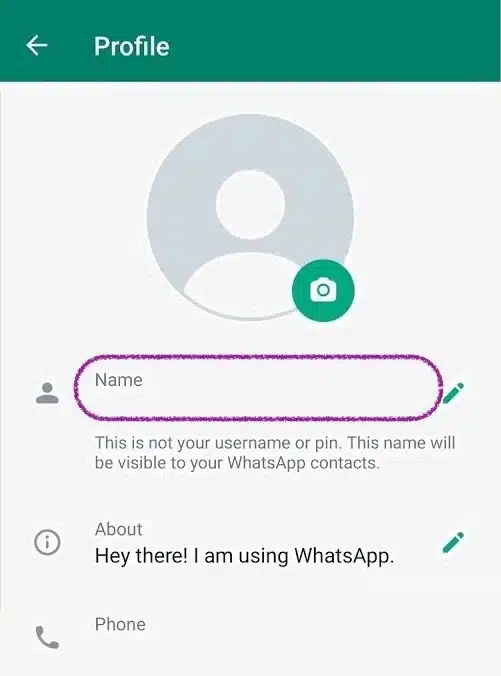
Go to Settings → tap your profile (your name or picture at the top).
Tap your Name field.
Delete your current name completely.
Now you need a special blank character instead of a regular space:
Scroll down to the “WhatsApp Invisible Name Copy And Paste” section on this page.
Copy one of the invisible characters or presets from there.
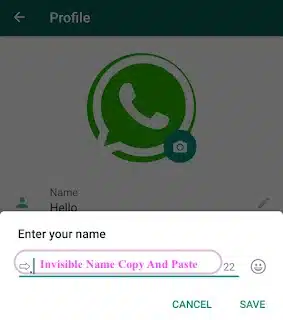
Come back to WhatsApp and paste that character into the Name field.
Tap Save or Done.
Copy paste blank name in Whatsapp
If the method works on your device, your profile will now show as blank or almost blank in chats, group participants, and contact lists that do not have you saved under a custom name.
✅ Tip: Always test with a friend. Ask them to send you a screenshot of how your name looks in their chats and group lists, so you know if the character really appears invisible on different devices.
WhatsApp Invisible Name Copy And Paste
This is where a lot of the magic happens. Instead of typing normal letters, you use a special blank character that looks like empty space but is still valid text.
Use this section as your WhatsApp invisible name copy and paste area:
Scroll down here to copy one of the invisible characters or ready-made “blank name” presets.
Paste it into your WhatsApp Name field, or into your About or Status line if you want those to look empty too.
Save the change and check how it looks in your chats and groups.
👉 Just scroll down below this heading to copy the blank name/message characters from the app on this page.
𓊆SMALL𓊇
𓊆BIG𓊇
𓊆MEDIUM𓊇
𓊆 LONG BLANK NAME 𓊇
Use the no name name generator below to build multiple blank name variations in seconds.👇
✨ Create cool nicknames and no-name styles for Facebook, X (Twitter), TikTok, Instagram, Discord, YouTube, plus Free Fire, CODM, Steam, PUBG, Roblox and more — cute, aesthetic, gamer & fantasy names in just one click.
🎵 TikTok📸 Instagram💬 DiscordX / Twitter📘 Facebook📱 WhatsApp📨 Telegram🎮 Games
A WhatsApp blank name generator makes it easier to experiment with different invisible characters and lengths. Instead of guessing which Unicode character will work, you can simply click or tap options and copy them in one step.
In this section, you can:
Generate short and long blank strings that still count as text to WhatsApp.
Copy a single invisible character or a repeated blank pattern for a wider empty look.
Test different options in your name, status, or even in messages to see which version looks the best on your device.
👉 Scroll down under this heading to use the app, generate your own blank combinations, and copy them directly into WhatsApp.
There is no separate “group name” for each person: WhatsApp uses the same profile name everywhere (chats, calls, groups). That means you cannot set one name for private chats and a different one for groups only. But you can still make your name look empty inside a group by using the same invisible-name trick above.
Make your name look blank in group participants
Follow the steps in the “How To Hide Name In WhatsApp” section to set an invisible profile name.
After saving, open any WhatsApp group you are in.
Tap the group title → check the list of participants.
If everything is working, your entry in the group list should now show as a blank or nearly blank name, with only your number or profile picture revealing who you are.
Your phone number is still visible to group members who do not have you saved.
Group admins and other participants can still see your profile photo and about text, depending on your privacy settings.
You cannot completely remove yourself from the group list without leaving the group.
If your goal is just to have a minimal look (no visible text name), the invisible name method is enough. If your goal is privacy, you should also adjust your WhatsApp privacy settings (Last seen, Profile photo, About, Status) and be careful about which groups you join.
Even with an invisible name, people can still see your number and some info depending on your privacy settings. Here are some practical tips if you want to hide your name or reduce what non-contacts can see:
Use an invisible name + limited profile info Combine the blank profile name with a simple or empty “About” line. You can also remove any personal info from your Status updates that you do not want strangers to read.
Adjust your privacy settings In Settings → Privacy, set Last seen and online, Profile photo, About and Status to “My contacts” or “Nobody” instead of “Everyone”. This way, people who are not saved in your contact list will see much less about you.
Be careful with profile photos Even if your name looks blank, a very personal or recognizable profile picture still reveals who you are. Use a neutral avatar if you want to stay low-key.
Avoid third-party apps or “mods” Do not install any external tools that promise “full hide name”, “hide number”, or special privacy hacks. These are often unsafe and can risk your WhatsApp account or your data.
Remember group visibility In groups, non-contacts can still see your phone number, and sometimes your photo, depending on your settings. An invisible name helps you look minimal, but it is not a complete anonymity shield.
Used correctly, an invisible name, a good WhatsApp blank name generator, and smart privacy settings give you a cleaner, more private profile without breaking any rules or risking your account.
How To Hide Your Name From WhatsApp Status Viewers
You cannot completely hide your contact name in WhatsApp from status viewers, but you can limit what they see. First, set an invisible name (using the blank characters from this page) so your profile name looks empty.
Then go to Settings → Privacy → Status and choose My contacts, My contacts except…, or Only share with…. That way, only selected people can see your status at all, and they will mostly see your number plus your invisible name.
How To Remove Name From WhatsApp On Android
On Android, WhatsApp requires some form of text in the name field, so you cannot leave it fully empty. The workaround is to replace your visible name with a blank character:
Open WhatsApp → Settings → tap your profile.
Tap your Name field and delete your current name.
Scroll down on this page and copy a character from the WhatsApp invisible name copy and paste section.
Paste it into the Name field and tap Save.
This does not remove your name from the app’s database, but it makes it look blank in chats and group lists.
How to hide my name on whatsapp from someone without blocking on iPhone & Android:
On iPhone, the steps are almost the same as Android:
Open WhatsApp → Settings.
Tap your profile card at the top, then tap your Name.
Clear your current name so the field is empty.
Use the WhatsApp blank name generator on this page to copy an invisible character.
Paste it into the Name field and tap Done.
Other people will now see an almost empty line where your name usually appears, although they can still see your phone number, and contacts may see a custom name they saved in their own address book.
How To Hide Name In WhatsApp Group
You cannot set a special “group-only” name, because the same profile name is used everywhere in WhatsApp. To hide your name in a group:
Set an invisible profile name using the steps above (Android or iPhone).
Open the group → tap the group title → check the participants list to see how your name appears.
Remember:
Group members who saved you in their contacts will still see the contact name they chose.
People who don’t have you saved will see your number and your invisible name.
If you want extra privacy beyond a blank name, combine this with tighter Privacy settings for profile photo, about and status, and be careful which groups you join.