Use this JavaScript obfuscator online free tool to turn readable JavaScript into harder-to-read code for safer publishing on websites, landing pages, widgets, and frontend projects. It is designed for quick use, clean output, and beginner-friendly protection without requiring server setup.
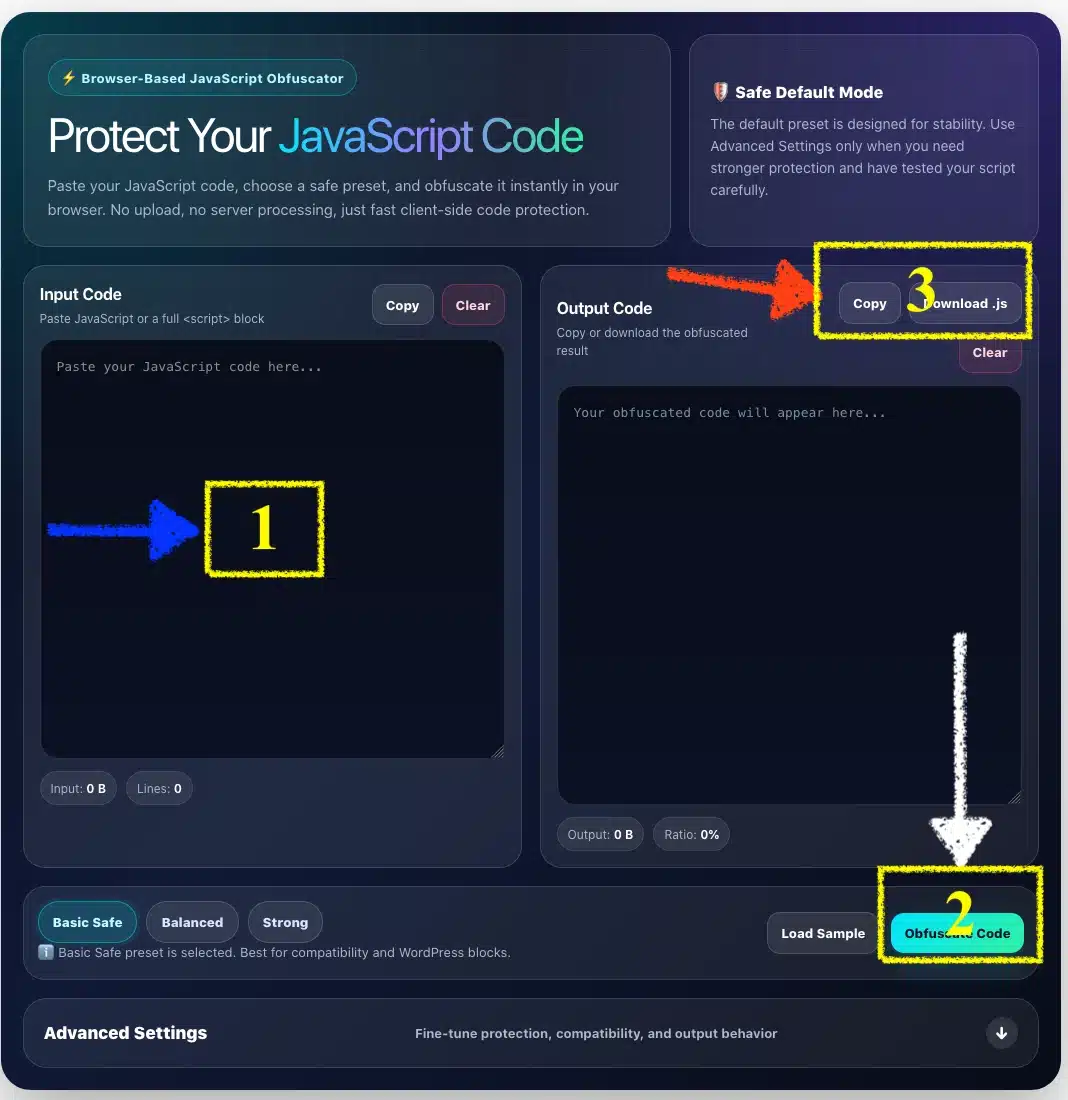
Paste your JavaScript code, choose a safe preset, and obfuscate it instantly in your browser. No upload, no server processing, just fast client-side code protection.
🛡️ Safe Default Mode
The default preset is designed for stability. Use Advanced Settings only when you need stronger protection and have tested your script carefully.
Input CodePaste JavaScript or a full <script> block
Input: 0 BLines: 0
Output CodeCopy or download the obfuscated result
Output: 0 BRatio: 0%
Ready. Basic Safe preset is selected.
Advanced Settings Fine-tune protection, compatibility, and output behavior
Obfuscates code inside script tags and keeps the wrapper.
Removes extra whitespace and makes output smaller.
Applies safe transformations before obfuscation.
Moves strings into encoded arrays to make reading harder.
Shuffles lookup order for stronger string hiding.
Randomizes string array structure.
Transforms plain numbers into calculated expressions.
Breaks long strings into smaller pieces.
Obfuscates object property keys when possible.
Stronger protection, but may increase file size and CPU usage.
Adds fake code paths. Use carefully for production pages.
Keep disabled if your HTML uses inline onclick functions.
Can break if cache/minify plugins rewrite the script.
May hurt user experience. Not recommended by default.
Removes common console messages from the protected code.
Use Base64 or RC4 only after testing.
Recommended: 0.60 – 0.90.
Recommended: 0.10 – 0.30.
Keep low for better performance.
Only applies when Split strings is enabled.
Use 0 for random output each time.
One name per line. Useful when a function is called from inline HTML.
Production tip: Basic Safe and Balanced are the best choices for WordPress blocks. Strong settings can make code harder to read, but may increase file size, slow down mobile devices, or conflict with cache/minify plugins.
Copied
What Is a JavaScript Obfuscator?
A JavaScript obfuscator is a tool that converts normal, readable JavaScript code into a more complex version that is harder for humans to understand.
For example, a clean function name like:
function copyText() {}
may become something like:
function _0x4a91b2() {}
The code can still run in the browser, but the structure becomes more difficult to read, copy, modify, or reverse-engineer.
A JavaScript obfuscator online tool is useful when you want to protect frontend scripts before publishing them on a website. It does not make JavaScript impossible to decode, but it can make the code much harder to analyze quickly.
Many website owners, developers, and tool creators use obfuscation because frontend JavaScript is visible in the browser. Anyone can inspect a page, open developer tools, and view loaded scripts.
A JS obfuscator online tool helps by making your JavaScript less readable before you publish it.
Common reasons to use this tool include:
Protecting custom frontend logic
Making copied code harder to reuse
Hiding readable variable and function names
Making browser scripts harder to modify
Preparing JavaScript before embedding it into HTML blocks
Protecting small web tools, calculators, generators, and widgets
This tool is especially helpful for users who need a JavaScript obfuscator free solution without installing Node.js, npm, or a command-line tool.
How to Use This JavaScript Obfuscator Tool
Using the tool is simple. You do not need coding setup, terminal commands, or build tools.
Follow these steps:
Copy your JavaScript code.
Paste it into the Input Code box.
Keep the default Basic Safe preset for the most stable result.
Click Obfuscate Code.
Copy the result from the Output Code box.
Test the obfuscated code before publishing it.
How to Use This JavaScript Obfuscator Tool
The default mode is designed for general website use. It gives a good balance between protection and compatibility.
Basic Safe Mode for Fast Obfuscation
The default mode is best for most users. It is created for quick use and lower risk of breaking your script.
Basic Safe mode is suitable for:
WordPress HTML blocks
Blogger widgets
Landing page scripts
Simple JavaScript tools
Copy button scripts
Random generator scripts
Countdown scripts
Frontend UI effects
This mode usually keeps your code stable while making it harder to read.
Balanced mode is useful when you want stronger obfuscation but still care about performance and compatibility.
It may include options such as:
String array protection
String array rotation
Number transformation
Object key transformation
Light string splitting
Light control flow transformation
Balanced mode is a good choice for website tools and frontend scripts after you test the output carefully.
Strong Mode for Advanced Users
Strong mode makes your code harder to read, but it can also make the output heavier.
Use it carefully if your script includes:
Inline HTML events such as onclick
WordPress shortcode output
Plugin-generated JavaScript
External library dependencies
Large DOM manipulation blocks
Code that must load very fast on mobile
For most websites, Strong mode should be used only after testing the script on desktop and mobile.
JavaScript Obfuscator vs Minifier
A JavaScript minifier and a JavaScript obfuscator are not the same thing.
A minifier mainly reduces file size by removing spaces, line breaks, and comments. It may also shorten some variable names.
An obfuscator focuses more on making code hard to understand. It may rename identifiers, move strings into arrays, transform numbers, flatten logic, and change the structure of the script.
Simple comparison:
Feature
Minifier
Obfuscator
Reduces file size
Yes
Sometimes
Makes code harder to read
Slightly
Yes
Renames variables
Sometimes
Yes
Hides strings
No
Often
Changes code structure
Rarely
Yes
Best for code protection
No
Yes
If your goal is speed optimization, use a minifier. If your goal is code protection, use a JavaScript obfuscator.
Can Obfuscated JavaScript Be Decoded?
This is a common question because many users search for terms like JavaScript obfuscator decoder, JS Obfuscator deobfuscator, or JavaScript deobfuscation tools.
The honest answer is: sometimes partially, but not perfectly.
A decoder or deobfuscator may be able to:
Format the code
Decode simple strings
Rename some variables manually
Reveal parts of the logic
Make the output easier to inspect
However, it usually cannot restore the exact original source code.
Things that are often lost after obfuscation include:
Original variable names
Original function names
Comments
Formatting style
Developer notes
Clean file structure
That is why you should always keep your original source code safe. Obfuscated output should be treated as a publishing version, not as your main editable source.
Is JavaScript Obfuscation Real Security?
JavaScript obfuscation is useful, but it is not absolute security.
Because JavaScript runs in the browser, the browser must be able to read and execute it. Skilled developers can still inspect, debug, and analyze the code if they spend enough time.
Use obfuscation to make code harder to copy, harder to modify, and harder to understand quickly. Do not use it to hide passwords, private API keys, secret tokens, payment credentials, or sensitive backend logic.
Never put sensitive secrets inside frontend JavaScript.
For serious protection, keep important logic on the server side.
What Is javascript-obfuscator on npm?
Many developers search for Javascript-obfuscator – npm, Js obfuscator npm, or javascript-obfuscator npm because they want to use obfuscation in a build workflow.
The javascript-obfuscator npm package is commonly used for JavaScript obfuscation through CLI and Node.js workflows. Obfuscator.io documentation also recommends using the npm package directly for many production and larger-file use cases.
A typical npm workflow may look like this:
npm install -g javascript-obfuscator
Then you can obfuscate a file:
javascript-obfuscator input.js --output output.js
The online tool on this page is easier for quick browser-based use, while npm is better for developers who want to automate obfuscation during build or deployment.
What About javascript-obfuscator GitHub?
Some users search for Javascript-obfuscator github, Js obfuscator github, or related GitHub repositories to check the source, documentation, and project details.
The official GitHub project describes JavaScript Obfuscator as a free tool with multiple features for protecting JavaScript source code.
For everyday users, the online tool is faster. For developers, GitHub and npm are useful when building automated workflows, custom configurations, or deployment scripts.
You may also see people searching for JavaScript obfuscator io or comparing tools like Obfuscator.io, npm packages, GitHub projects, and browser-based JS obfuscator tools.
Obfuscator.io describes its tool as a JavaScript obfuscator for protecting source code from theft and reverse engineering.
This online tool is designed for users who want a fast and clean experience:
Paste code
Choose preset
Obfuscate instantly
Copy output
Publish after testing
It is a practical choice when you need a JS obfuscator online free tool for quick work.
Does This Tool Support HTML Obfuscator Needs?
This page is mainly a JavaScript obfuscator, but it can also help when your JavaScript is inside an HTML block.
For example, if you paste:
<script>
  function hello() {
    alert("Hello");
  }
</script>
the tool can detect the <script> block and obfuscate the JavaScript inside it.
This is useful if you need a simple HTML obfuscator workflow for HTML pages that contain inline JavaScript.
However, pure HTML tags are not truly protected by JavaScript obfuscation. HTML structure is still visible in the browser. If your goal is to protect JavaScript inside HTML, this tool can help. If your goal is to hide the entire HTML layout, there is no perfect frontend-only solution.
Does This Tool Work as a CSS Obfuscator?
This tool is made for JavaScript, not CSS.
A CSS obfuscator usually works differently. CSS tools may minify class names, reduce whitespace, rewrite selectors, or integrate with a build system.
JavaScript obfuscation should not be used directly on CSS code.
Use this tool for:
JavaScript
JS inside <script> tags
Frontend scripts
Browser widgets
Web app logic
Do not use it for:
CSS files
HTML-only pages
JSON data
PHP code
Server-side secrets
Best JavaScript Obfuscator Settings for Websites
The best JavaScript obfuscator settings depend on your project.
For most websites, the best setup is not always the strongest setup. A very strong configuration can make code heavier, slower, or more likely to break.
Recommended settings for general websites:
Use Case
Recommended Mode
WordPress HTML block
Basic Safe
Small website widget
Basic Safe
Copy button script
Basic Safe
Random generator app
Balanced
Frontend calculator
Balanced
Game-like browser tool
Balanced or Strong
Large production app
npm/build workflow
Sensitive backend logic
Do not put it in frontend JS
If you want the safest result, start with Basic Safe. If the code still works after testing, try Balanced. Use Strong only when you understand the risk and have tested the output.
Yes. This is a free online JavaScript obfuscator that lets you paste code, obfuscate it, and copy the result.
Is obfuscated JavaScript impossible to read?
No. Obfuscation makes JavaScript harder to read, but not impossible to analyze. Skilled developers may still reverse-engineer parts of the code.
Can I use this tool as a JavaScript obfuscator decoder?
No. This tool is designed to obfuscate JavaScript, not restore obfuscated code. A decoder or deobfuscator may clean up some code, but it usually cannot recover the exact original source.
Can I paste HTML code into this tool?
Yes, if your HTML contains JavaScript inside <script> tags. The tool is mainly for JavaScript, but it can support common HTML obfuscator use cases where the goal is to protect inline scripts.
Can I obfuscate CSS with this tool?
No. This is not a CSS obfuscator. Use a CSS minifier or class-name optimization workflow for CSS files.
Should I use Basic, Balanced, or Strong mode?
Use Basic Safe for the best compatibility. Use Balanced if you want stronger output. Use Strong only after testing carefully.
Does obfuscation protect API keys?
No. Never place private API keys, passwords, tokens, or sensitive data inside frontend JavaScript. Move sensitive logic to the backend.
Is npm better than an online obfuscator?
For quick use, an online tool is easier. For build automation, the javascript-obfuscator npm package is better because it can be integrated into CLI, Node.js, and deployment workflows.
A JavaScript Obfuscator Online Free tool is a practical way to protect browser scripts before publishing them. It helps make JavaScript harder to read, harder to copy, and harder to modify quickly.
For the best result, use Basic Safe or Balanced mode, keep your original source code, and always test the obfuscated output before adding it to a live website.